Latest Release
Snare Central v8.8.2

Snare Central — Log Management & SIEM Forwarding
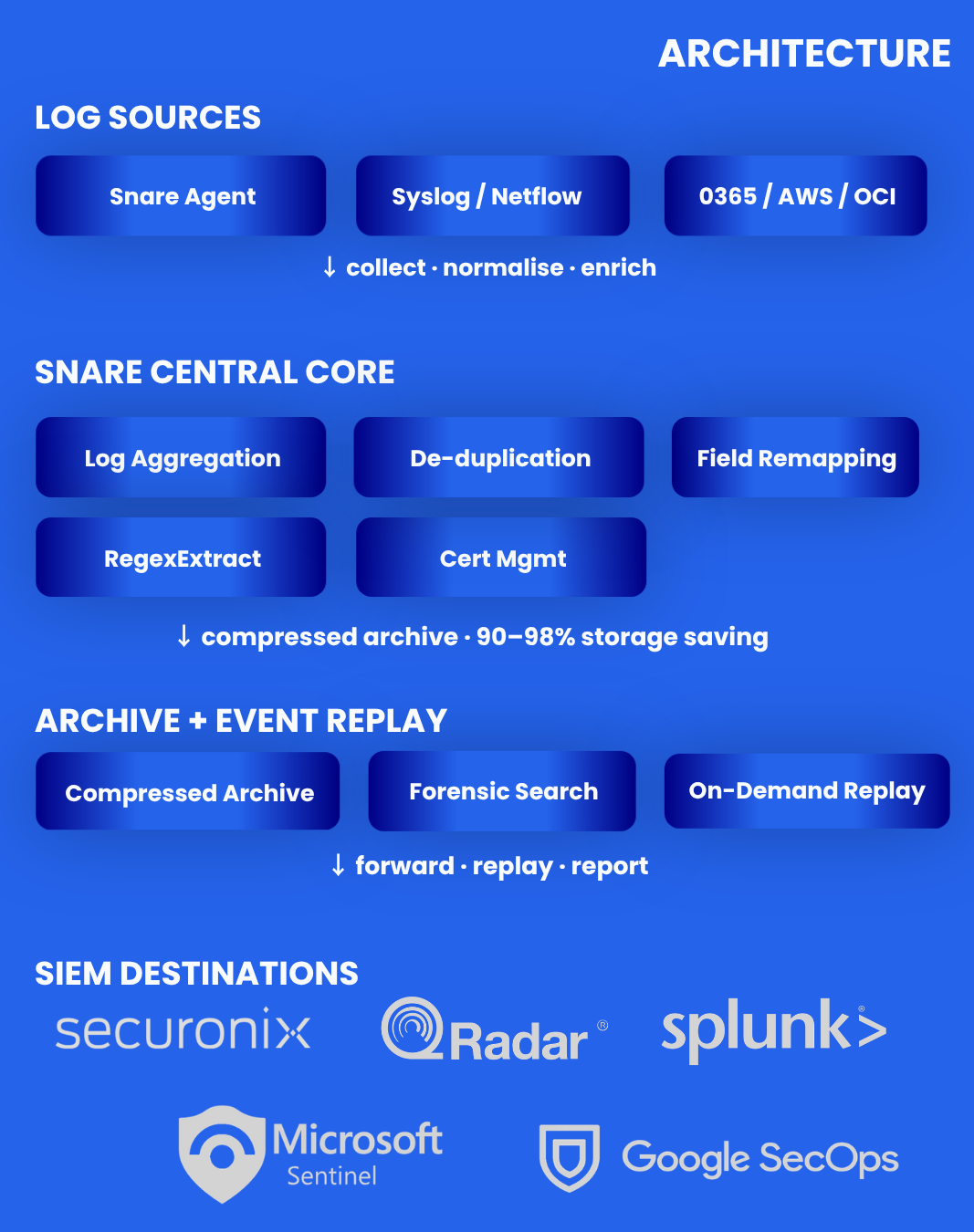
Snare Central is a enterprise log management and security event forwarding platform that sits between yourlog sources, endpoints, cloud services, and network infrastructure, and your SIEM. It collects logs at scale, reduces ingestion volume through aggregation and de-duplication, and forwards high-fidelity data to every major SIEM platform, cutting costs without cutting coverage.
Snare Central addresses the three core problems facing enterprise security teams and MSSPs: SIEM ingest cost overrun, low analyst signal-to-noise ratios, and fragmented visibility across endpoint, network, and cloud log sources, in a single, centrally managed platform.
✓✓| ✓ ✓
Current Agent release
Cloud sources: Azure, M365, AWS, Oracle Cloud
Event format support for aggregation
Pre-built compliance reports
SIEM ingestion costs spiral as log volumes grow. Analysts waste hours on duplicate alerts that add no detection value. Cloud sprawl creates visibility gaps across Azure, M365, AWS, and Oracle Cloud workloads. And managing thousands of endpoint agents requires orchestration, not manual remote sessions.
| Problem | Root Cause | Snare Central Solution |
|---|---|---|
| SIEM costs out of control | Every duplicate event forwarded adds to SIEM ingestion billing. Without aggregation at the collection layer, you pay your SIEM vendor to store noise. | Log Aggregation & De-duplication consolidates duplicate and similar events into single enriched records within a configurable time window — reducing ingest volume before it reaches any pricing threshold. |
| Low signal-to-noise ratio | Duplicate alerts and verbose log fields overwhelm analyst queues, burying genuine threats in noise. | Advanced Field Remapping with RegexExtract gives per-destination control over which fields are forwarded, how they are named, and which log types use which schema. |
| Endpoint agent sprawl | Managing thousands of Snare Agents without central orchestration creates operational risk and compliance gaps. | Snare Agent Manager (SAM) provides centralised configuration, licence management, remote upgrade, and network-scan-based agent discovery — no console access required. |
| Cloud log visibility gaps | Security teams lack unified collection across endpoint, network, and cloud log sources, leaving Azure M365, AWS, and OCI workloads outside the security data pipeline. | Cloud Logs Collection natively ingests Azure, Microsoft Office 365, AWS (CloudTrail, GuardDuty, VPC Flow Logs), and Oracle Cloud Infrastructure logs — normalised into the same pipeline as endpoint data. |
Core Capabilities
Consolidates duplicate or similar events from the same source into a single enriched event within a configurable time window. Rules are defined per Log Type, Event ID, or specific field values. Original event detail is preserved in aggregation metadata, so nothing is dropped from the forensic record, only the volume forwarded to the SIEM is reduced.
Business ImpactDirect reduction in SIEM ingestion volume and cost at the collection layer, before any event reaches billing.
| Aggregation scope | Per-destination and per-log-type — rules configured independently per SIEM destination |
| Rule criteria | Log Type, Event ID, or specific field values |
| Time window | Configurable consolidation window — tune to your environment’s event frequency |
| Event fidelity | Original event detail preserved in aggregation metadata — no data loss, only volume reduction |
| Format support | 100% — Windows, Linux, Syslog, NetFlow, Cloud, JSON |
Apply field remapping across every destination type — Splunk HEC, Microsoft Sentinel, Securonix, Syslog RFC 5424 JSON, and Generic JSON. RegexExtract extracts specific values from log fields using regular expressions and maps them to destination fields. Enhanced Splunk CIM templates improve Windows event field coverage. A per-Log-Type “Send / Do Not Send Unmapped Fields” toggle provides explicit control over whether fields without a mapping are forwarded or suppressed.
Business ImpactReduces forwarded log payload size. Improves SIEM schema alignment. Eliminates custom parsing code for field extraction.
| Destination support | Splunk HEC, Sentinel, Securonix, Syslog RFC 5424 JSON, Generic JSON |
| RegexExtract | Extract values from any log field using regex; map to destination field |
| Splunk CIM templates | Built-in templates with Windows event field coverage |
| Unmapped fields toggle | Per-Log-Type explicit control over what reaches each SIEM |
| ASIM templates | Microsoft Sentinel ASIM field mapping — applied on forwarding and replay |
| Custom schemas | Admin or customer-defined field mapping for any target platform |
Replay any archived time window from the Snare Central compressed archive back into Splunk or Microsoft Sentinel on demand. Critical for post-incident investigation — analysts search historical log windows in their SIEM without requiring permanent hot storage of all data. Also supports detection rule testing against real historical events and satisfies compliance audit requirements for log evidence availability.
Business ImpactPay for SIEM insight when you need it. Eliminates the trade-off between retention pricing and investigation depth.
| Destinations | Microsoft Sentinel (native HTTPS + ASIM remapping) and Splunk (HEC) |
| Use cases | Post-incident investigation, threat hunts, detection rule testing, compliance audit evidence |
| Archive compression | 90–98% storage savings at rest — replay only what is needed |
| Schema mapping | Sentinel ASIM and Splunk CIM remapping applied on replay |
A Manage Certificates page in the Reflector UI allows administrators to upload, view, and delete TLS certificates centrally. mTLS destination configuration references pre-uploaded certificates by name rather than requiring per-destination certificate paste. Strict certificate chain validation is configurable — when enabled, the full certificate chain is validated, not just the leaf certificate.
Business ImpactReduces operational risk from certificate misconfiguration. Simplifies rotation across multiple SIEM destinations.
| Certificate UI | Manage Certificates page in Reflector UI — upload, view, delete centrally |
| mTLS destinations | Config references pre-uploaded certificates by name — no per-destination paste |
| Chain validation | Configurable strict validation — validates full chain, not just the leaf certificate |
| System patching | System packages updated to mitigate known CVEs; kernel changes on upgrade |
Create multiple destinations that share the same underlying SIEM connection details but serve different cloud tenancies or customer endpoints independently. Each destination maintains its own event counts, EPS metrics, and error reporting, persisting across renames and connection detail changes. Destination names support spaces and special characters, enabling descriptive naming conventions that match client environments.
Business ImpactMSSPs serve multiple client tenancies from a single Snare Central instance without losing per-client visibility.
| Multi-tenant model | Multiple destinations with identical connection details — one per client tenancy |
| Independent statistics | Per-destination event counts, EPS, and error reporting — persist across renames |
| Destination naming | Spaces and special characters supported — descriptive naming without workarounds |
The Agent Event Volumes Sensitivity setting allows SOC teams to configure event-surge alert thresholds using standard deviation bands (1σ, 2σ, or 3σ). Environments with naturally variable event volumes can tune sensitivity to reduce false positive alerts without compromising detection of genuine anomalies. The Health Checker File Integrity report filters out files that change during normal operation, surfacing only genuine integrity violations.
Business ImpactOperations teams see genuine anomalies, not noise from expected event volume variation — without compromising detection.
| Sensitivity setting | 1σ (tight), 2σ (balanced), or 3σ (loose) alert thresholds |
| FIM Health Checker | Filters files that change during normal operation — surfaces only genuine violations |
| HA validation | High Availability configuration validates IP address uniqueness — prevents misconfiguration |
Technical Specifications
//Compression ratio – 90–98% storage savings at rest versus SIEM hot storage — consistent across Windows events, Linux syslog, and cloud formats
//Retention policy – Configurable multi-year retention with no per-GB ingestion fees — store what compliance requires
//Log Aggregation – De-duplication and consolidation at the collection layer — configurable per destination and log type
//Event Replay – Any archived time window replayed to Splunk or Sentinel on demand — schema remapping applied
//Storage backends – Local disk, NAS, SAN; S3-compatible object storage for hybrid and cloud deployments//Data integrity – Hash verification on archive ingestion and retrieval — tamper-evident storage throughout
//Microsoft Sentinel – Native HTTPS to Azure Log Analytics. Full Event Replay support. Sentinel ASIM schema remapping included.
//Splunk HEC – HTTP Event Collector (HTTP/HTTPS), cloud and on-premises. Enhanced Splunk CIM field mapping for Windows events.
//Securonix – Native Securonix syslog format for clean platform parsing. Built-in parsers.
//IBM QRadar– LEEF format syslog delivery — on-premises deployments.
//Secureworks Taegis– Native integration with built-in parsers.
//Elasticsearch– Bundled for analytics and threat intelligence workflows.
//Syslog RFC 5424 JSON– Full field remapping — RegexExtract and unmapped fields toggle available.
//Generic JSON– Full field remapping — RegexExtract and unmapped fields toggle available.
//Authentication – Microsoft Entra ID SSO + MFA with live group sync on every administrator login
//Authorisation – Role-based access control (RBAC) — multi-tenant isolation, per-customer data scoping
//Certificate management – Centralised TLS certificate upload, view, delete via Reflector UI; mTLS references pre-uploaded certificates by name
//Certificate validation – Configurable strict chain validation — full chain validated, not just leaf certificate
//HA deployment – High Availability configuration module with IP address uniqueness validation
//Compliance reports – 600+ pre-built reports: PCI-DSS v4.0, HIPAA, ISO 27001, NIST CSF, SOX ITGC, NERC CIP
//Forensic search – Full-text search across compressed archive with time-range and event-type filtering
//Deployment options – On-premises (bare metal/VM), virtual appliance, private cloud. Hybrid with S3-compatible backend.
//Destination coverage – Splunk HEC, Sentinel, Securonix, Syslog RFC 5424 JSON, Generic JSON
//RegexExtract – Extract field values via regex; map extracted value to any destination field
//Splunk CIM templates– Built-in templates with Windows event field coverage — detection rule alignment
//Unmapped fields toggle – “Send / Do Not Send Unmapped Fields” per Log Type — explicit payload control per destination
//ASIM templates– Microsoft Sentinel ASIM field mapping — applied on forwarding and event replay
//Custom schemas– Admin or customer-defined field mapping for any target platform
//Microsoft Office 365 – Audit logs, activity logs, security alerts — collected via Cloud Logs Collection module
//Amazon Web Services – CloudTrail, GuardDuty, VPC Flow Logs, and other AWS log sources via Cloud Logs Collection
//Oracle Cloud (OCI)– OCI audit and service logs alongside endpoint and network data — 1 built-in report
//Normalisation – All cloud sources normalised and fed into the same aggregation, enrichment, and forwarding pipeline as endpoint data
//Remote management – Centralised configuration, licence management, remote upgrade for Snare Agents v5.4.0+ across all endpoints
//Network scan discovery – Scan-based agent discovery — identify and onboard unmanaged endpoints without console access
//Lifecycle management – Configuration push, licence validation, and upgrade orchestration from a single SAM interface
//Executive Dashboard – Events-per-second and bytes-per-second telemetry per destination for client-facing reporting
FOR MSSP’s
Snare Central’s architecture and centralised agent management make it the log collection backbone for MSSPs running security operations at scale. Multi-tenant destination isolation, per-client statistics, flexible SIEM support, and live SSO group synchronisation are core platform capabilities — not add-ons.
Per-client tenancy isolation
Multi-Tenant Destinations — multiple destinations with identical connection details, one per client tenancy. Independent per-destination statistics persisting across renames.
Remote agent lifecycle management
Snare Agent Manager (SAM) — centralised configuration, licence management, remote upgrade, and network-scan-based discovery across all managed endpoints.
Client-facing reporting
Executive Dashboard — EPS and Bps per destination. Consolidated scheduled reports with email body content included for client delivery.
Identity & access security
Entra ID SSO with live group sync on every administrator login — permissions always reflect IdP state. Critical for managing staff turnover across client accounts.
SIEM flexibility
Forward to client’s SIEM of choice: Sentinel, Splunk, QRadar, Securonix, Google SecOps, Taegis, Syslog. Full field remapping per destination.
Alert fatigue management
Configurable Agent Event Volumes Sensitivity (1σ–3σ) — tune surge alert thresholds to each client environment’s baseline.
Log cost management for clients
Log Aggregation & De-duplication at the collection layer reduces SIEM ingest volume per client — protecting margins and demonstrating cost value.
USE CASES
CISO / FinOps
A large enterprise was paying SIEM ingestion costs for tens of thousands of duplicate Windows Security events per hour — logon events from the same accounts hitting multiple domain controllers generating near-identical records. Snare Central Log Aggregation & De-duplication was configured per Log Type (Security / Event ID 4624) with a 60-second consolidation window, collapsing duplicates before forwarding. No SIEM changes. No agent changes.
Outcome
SIEM ingest volume for Security event logs reduced by over 50% within 24 hours of configuration. Direct reduction in monthly SIEM ingestion billing. Full event fidelity maintained in Snare Central archive via aggregation metadata.
SOC / Incident Response
Following a credential compromise incident, the IR team needed to search 4 months of log history in Sentinel to establish the full attack timeline — lateral movement, privilege escalation, and data access. The data was archived in Snare Central. Using Event Replay to Sentinel, the IR team replayed the relevant 4-month window with ASIM schema mapping, ran the full investigation using native KQL queries, then stopped replay when done.
Outcome
Full 4-month investigation dataset available in Sentinel within 2 hours. IR team used native Sentinel tooling throughout. No permanent Sentinel retention expansion required. Investigation completed same day.
MSSP
An MSSP managing 80 client environments was forwarding all client logs to a shared Sentinel workspace due to the limitation of one destination per SIEM endpoint. Multi-Tenant Destinations allowed the MSSP to create individual destinations per client tenancy — all referencing the same Sentinel connection — with per-destination statistics providing independent per-client visibility. Client naming conventions with spaces and special characters were immediately applied.
Outcome
80 client-isolated destinations configured in a single deployment. Per-client event statistics available for client-facing reporting. Migrated from shared to per-client destination model in one maintenance window.
Security & Compliance
Snare Central ships with security controls that address the specific requirements of CISOs operating in regulated industries, from mutual TLS with full certificate chain validation to live identity provider synchronisation and continuous system hardening.
| Security Control | Implementation |
| mTLS + Certificate Chain Validation | Full mutual TLS for all outbound SIEM connections. Configurable strict chain validation — validates the full certificate chain, not just the leaf certificate. |
| Centralised Certificate Management | Upload, view, and delete TLS certificates from the Reflector UI. mTLS destinations reference pre-uploaded certificates by name — no per-destination paste. |
| System Package Patching | System packages maintained to mitigate known CVEs. Kernel changes applied on upgrade per Ubuntu security advisories (post-upgrade reboot required). |
| Hardened User Management | Input validation for local user creation. SSO group membership refreshed live on every login — prevents privilege drift after directory changes. |
| File Integrity Health Monitoring | Health Checker File Integrity report filters out files that change during normal operation — surfaces only genuine integrity violations. |
| HA IP Uniqueness Validation | High Availability configuration validates IP address uniqueness — prevents accidental duplication in HA deployments. |
| Compliance Reports | 600+ pre-built reports: PCI-DSS v4.0, HIPAA, ISO 27001, NIST CSF, SOX ITGC, NERC CIP — generated from Snare archive, exportable for auditor delivery. |
FREQUENTLY ASKED QUESTIONS
Q: What is Snare Central and what problem does it solve?
Snare Central is an enterprise log management and security event forwarding platform. It sits between your log sources — endpoints, cloud services, and network infrastructure — and your SIEM. Its core function is to collect logs at scale, normalise and enrich them, reduce ingestion volume through aggregation, de-duplication, and filtering, and forward high-fidelity data to destinations such as Microsoft Sentinel, Splunk, Securonix, QRadar, and others. The result is lower SIEM ingestion costs, higher analyst signal-to-noise ratios, and unified visibility across hybrid environments.
Q: How does Log Aggregation & De-duplication reduce SIEM costs?
Snare Central consolidates duplicate or similar events from the same source into a single enriched event within a configurable time window. Rules are defined per destination based on Log Type, Event ID, or specific field values. The original event detail is preserved in aggregation metadata — so nothing is lost from the forensic record — only the volume forwarded to the SIEM is reduced. This operates at the collection layer, before any event reaches ingestion-based billing.
Q: How does Event Replay to Microsoft Sentinel work?
Event Replay allows archived logs stored in the Snare Central compressed archive to be replayed on demand directly into a Microsoft Sentinel workspace or Splunk. The team selects a time range and log types, Snare Central delivers with the appropriate schema mapping (ASIM for Sentinel, CIM for Splunk) applied, and the data appears in the SIEM for investigation. When the investigation is complete, replay stops — no permanent retention expansion and no additional ongoing ingestion cost.
Q: What cloud log sources does Snare Central collect from?
Snare Central’s Cloud Logs Collection module supports Microsoft Office 365 (audit logs, activity logs, security alerts), Amazon Web Services (CloudTrail, GuardDuty, VPC Flow Logs), and Oracle Cloud Infrastructure (OCI audit and service logs). All three sources are collected, normalised, and fed into the same aggregation, enrichment, and forwarding pipeline as endpoint and network data.
Q: Is Snare Central suitable for MSSPs managing multiple clients?
Yes. Snare Central is built for MSSP multi-tenant operation. Multi-Tenant Destinations allow multiple destinations with the same SIEM connection details to serve separate client tenancies, each with independent statistics. Snare Agent Manager provides centralised remote management of endpoint agents across all client environments. The Executive Dashboard provides per-destination telemetry for client-facing reporting. Configurable alert sensitivity tuning (1σ–3σ) reduces alert fatigue across variable-volume client environments.
Q: What SIEM platforms does Snare Central integrate with?
Snare Central forwards to Microsoft Sentinel (native HTTPS, full Event Replay, ASIM remapping), Splunk via HEC (Splunk CIM field mapping), Securonix, IBM QRadar, Secureworks Taegis, Elasticsearch, and any Syslog RFC 5424 JSON or Generic JSON destination. Field remapping with RegexExtract and unmapped fields control is supported for all destination types.
Q: Does Snare Central support High Availability deployments?
Yes. Snare Central includes a High Availability configuration module with IP address uniqueness validation to prevent accidental misconfiguration in HA deployments. HA deployments are recommended for enterprise and MSSP environments where log collection continuity is a compliance or SLA requirement.
Q: What is RegexExtract and when would I use it?
RegexExtract is a function in the Field Remapping engine that extracts a specific value from any log field using a regular expression and maps the extracted value to a destination field. For example, extracting a username from a freeform log message field and mapping it to a SIEM’s dedicated user field — without writing custom parsing code or maintaining a separate enrichment pipeline. It is available for all supported destination types